~5 min read
If you’ve ever opened a laptop or desktop and seen those long green sticks of memory plugged into the motherboard, you’ve seen a DIMM – or its smaller laptop cousin, the SODIMM. That form factor has been the standard for computer memory since the early 1990s. For over three decades, barely anything about the physical design changed.
That’s about to change. CAMM2 (Compression Attached Memory Module 2) – is the new standard that replaces DIMM and SODIMM, and it’s already appearing in business laptops you can buy today. Here’s what it is, why it matters, and what it means for the devices your organisation buys next.
What Is CAMM2 — And What’s Wrong With What We Have Now?
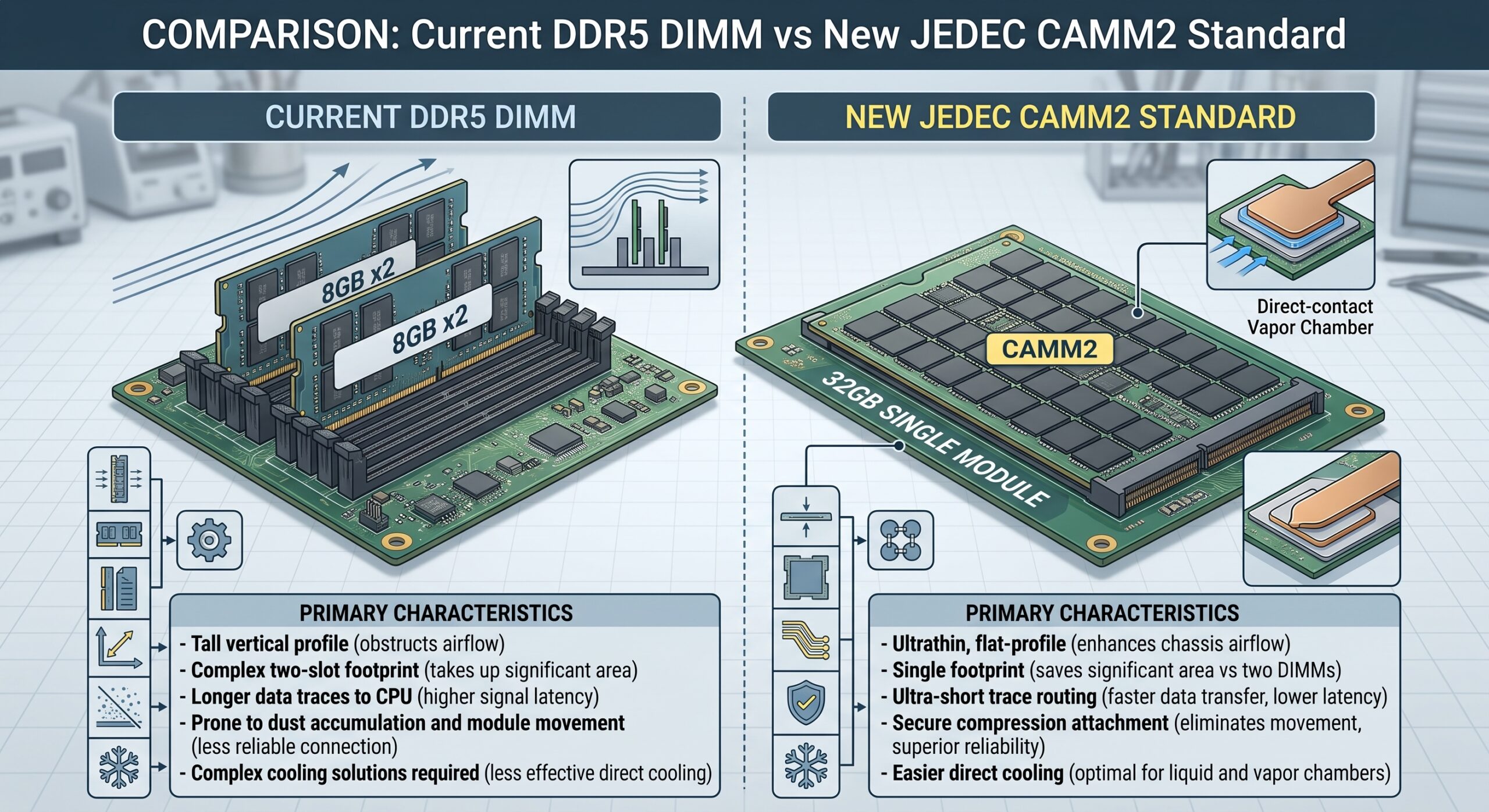
The familiar RAM stick has served us well, but it’s running into physical limits. As processors get faster and software demands more memory bandwidth, the long parallel pins of a DIMM create signal interference problems – essentially, the electrical signals start interfering with each other at higher speeds, limiting how fast the memory can run.
CAMM2 solves this with a fundamentally different physical design. Instead of a stick that slots vertically into a motherboard, a CAMM2 module lies flat against the board and is compressed down onto a grid of contacts. This shorter signal path means far less interference, enabling significantly faster memory speeds. The modules are also around 57% thinner than a traditional SODIMM, freeing up space inside a device for larger batteries or a slimmer chassis without sacrificing performance.
There are two closely related variants worth knowing:
– LPCAMM2: the laptop version, using low-power LPDDR5X memory. This is what’s appearing in business laptops right now. It combines the efficiency and speed of soldered memory (the kind that’s permanently fixed to the board and can’t be upgraded) with the upgradeability of a traditional slot. In short: thin and fast, but still replaceable.
– CAMM2: the desktop and workstation version, designed for standard DDR5 and eventually DDR6 memory. This is further from mainstream adoption and is currently only found in a handful of high-end workstations.
Why This Is Particularly Good News for Business Laptops
For years, laptop manufacturers pushed toward soldering RAM directly to the motherboard — permanently fixing the memory at the point of purchase. The benefit for manufacturers was thinner, lighter devices with better battery life. The cost for buyers was that there was no upgrade path. You had to predict at purchase how much RAM you’d need two or three years down the line, and if you got it wrong, the only option was to buy a new machine.
LPCAMM2 changes that equation. It packs the density and power efficiency of soldered memory into a removable module — meaning a device can be thin and efficient today, and have its memory upgraded later as workloads grow. For schools managing tight budgets and extended device lifecycles, and for small businesses that can’t afford to replace an entire fleet every time memory requirements creep up, this is genuinely meaningful.
Which Business Devices Have It Right Now?
Adoption is following the usual path for a new standard – starting at the top and working down. As of mid-2026, LPCAMM2 is available in a growing number of business-grade laptops from major manufacturers:
– Lenovo led the way. The ThinkPad P1 Gen 7 was the first commercially available laptop to use LPCAMM2 memory, back in 2024. Since then, Lenovo has expanded the standard across its ThinkPad and ThinkBook ranges.
– Dell was actually the original pioneer of the predecessor technology, and has continued to lead — bringing LPCAMM2 to its XPS and Pro series business laptops, from premium workstation models down to more mainstream business price points.
– HP has adopted LPCAMM2 in its EliteBook range.
– Asus has included it in its ProArt Studiobook series.
– Framework, a brand built around repairability, ships LPCAMM2 as standard across its laptop range with a fully documented upgrade path.
By mid-2026, LPCAMM2 has appeared in machines from Lenovo, Dell, HP, Asus, and Framework, with Samsung and SK Hynix now supplying modules alongside Micron — meaning supply is no longer dependent on a single manufacturer.
What About Desktops?
The picture is different here. CAMM2 DDR5 desktop RAM is real and standardised, but it is not yet a mainstream replacement for DDR5 DIMMs as of mid-2026. Standard DDR5 desktop memory remains the right choice for most desktop purchases today, and is expected to stay that way for several years. Desktop CAMM2 is likely to become mainstream only when DDR6 memory arrives – currently projected around 2028–2030.
The practical takeaway: if you’re refreshing desktop hardware in the near term, current DDR5 systems are a sound investment and will remain relevant well into the lifecycle of those machines. The CAMM2 conversation for desktops is a future one, not an immediate one.
What Does This Mean for Your Next Fleet Purchase?
The RAM standard your devices ship with has real implications for how long those devices stay fit for purpose – and whether upgrading memory down the track is even an option.
A few questions worth asking before your next device refresh:
1. Are you buying laptops that will be upgradeable? If the spec sheet says soldered memory, you’re locked in at the point of purchase. Devices with LPCAMM2 slots give you a future upgrade path as memory requirements grow – particularly relevant as AI-assisted tools demand more RAM to run locally.
2. Are your workloads becoming more memory-intensive? Staff using more browser tabs, video conferencing, local AI tools, and heavier applications than they were two or three years ago is the norm, not the exception. Devices that can’t be upgraded to meet that demand end up being replaced earlier than planned.
3. What’s your refresh cycle? If you’re due to refresh in the next 12–18 months, LPCAMM2-equipped devices from Lenovo, Dell, and HP are already available at business price points and worth specifying into your next purchase.
Thinking About Your Next Refresh?
Getting the right devices for your organisation – ones that stay capable and cost-effective across their full lifecycle – is exactly the kind of decision we help schools and small businesses think through.
If you’d like to discuss future-proofing your IT strategy and fleet purchases, contact us and let’s have a conversation about where your fleet is headed and what to prioritise next.
📞1300 676 498
Source: https://www.corsair.com/us/en/explorer/diy-builder/memory/what-are-camm2-and-lpcamm2/